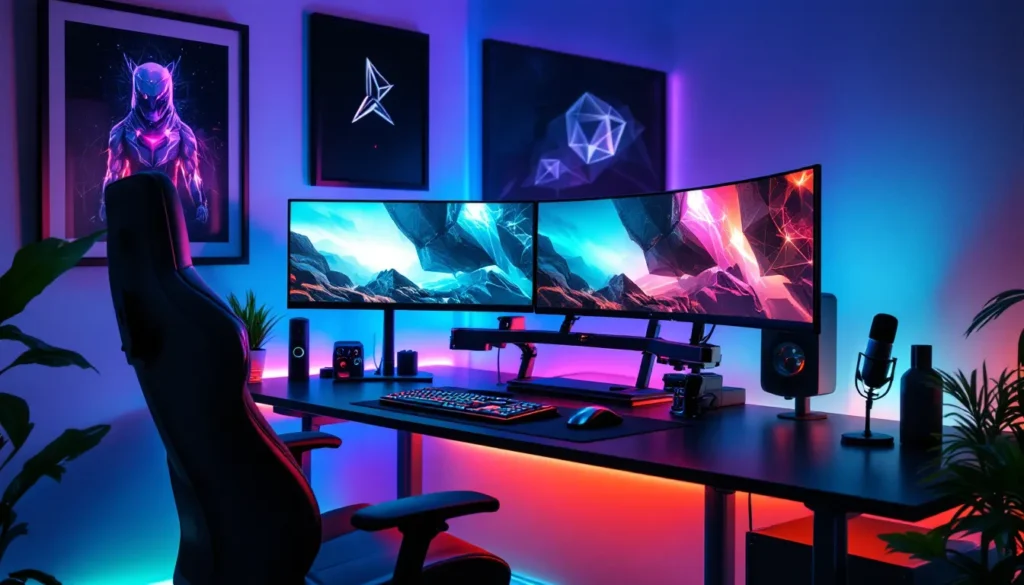
Your gaming setup is more than just a desk and a monitor, it’s your command center, your escape pod, and the place where you’ll spend hundreds (maybe thousands) of hours grinding ranked matches, exploring open worlds, or perfecting speedruns. But let’s be real: a cramped desk with tangled cables and a flickering overhead light isn’t cutting it anymore. The difference between a functional setup and a truly optimized gaming space comes down to the gaming stuff for your room that enhances comfort, performance, and atmosphere. Whether you’re finally upgrading from the kitchen table or you’re building a dedicated battlestation from scratch, the right essentials can reduce fatigue, boost focus, and make your space feel like it belongs on r/battlestations. This guide breaks down exactly what you need, from ergonomic furniture and lighting to audio gear and personalization touches, so you can build a room that matches your playstyle and budget.
Key Takeaways
- A quality gaming chair with lumbar support and adjustable features reduces fatigue and enables comfortable sessions lasting hours, making it the foundation of any gaming room setup.
- Layered lighting—combining ambient, task, and accent lighting with bias lighting behind your monitor—reduces eye strain and enhances both performance and atmosphere.
- Proper desk ergonomics, including correct height positioning and ample width (55+ inches) with cable management, improves posture and accommodates multi-monitor setups without strain.
- Strategic organization through cable trays, monitor arms, and storage solutions keeps your gaming space functional and camera-ready while protecting hardware from damage.
- Starting with essential gaming furniture and lighting, then gradually adding personalization elements like wall art, neon signs, and collectible displays, allows you to build your ideal room within any budget.
Essential Gaming Furniture for Maximum Comfort and Performance
Furniture forms the backbone of any gaming room. Get this wrong, and you’ll be shifting in your seat every 20 minutes or dealing with back pain after a single session. Get it right, and you can game for hours without even noticing the time.
Gaming Chairs: Finding Your Perfect Throne
Gaming chairs aren’t just aesthetics and branding, they’re ergonomic tools designed for long sessions. When choosing one, prioritize lumbar support, adjustable armrests, and a recline function that locks at multiple angles. Secretlab’s Titan Evo 2022 remains a top pick in 2026, offering memory foam cushions and a magnetic head pillow that actually stays in place. If you’re on a tighter budget, the GTRACING GT099 delivers surprising comfort around the $150 mark.
Don’t fall for the “racing seat” trap if you’re a larger or smaller build. Measure your height and weight against the chair’s specs, most brands list recommended ranges. And skip the all-mesh designs if you live somewhere cold: they’re breathable but brutal in winter.
For those who want to ditch the gamer aesthetic entirely, ergonomic office chairs like the Herman Miller Aeron or Steelcase Gesture offer superior build quality and adjustability. They cost more upfront but last a decade-plus. No RGB, though.
Gaming Desks: Space, Ergonomics, and Cable Management
Your desk needs to handle a multi-monitor setup, a full-size keyboard, a mouse with room to flick, and maybe a mic arm or stream deck. Gaming desks with at least 55 inches of width give you breathing room: anything under 48 inches feels cramped once you add peripherals.
Look for built-in cable management features, grommets, trays, or channels that keep your setup clean. The Uplift V2 standing desk is overkill for most, but if you alternate between sitting and standing, it’s worth the investment. For static setups, the IKEA Bekant or a simple Karlby countertop on Alex drawers hits the sweet spot of price and function.
Height matters more than most people realize. Your elbows should sit at a 90-degree angle when your hands rest on the keyboard. If your desk is too high, you’ll strain your shoulders: too low, and you’ll hunch. Adjustable legs or a footrest can fix mismatches.
Lighting Solutions That Transform Your Gaming Atmosphere
Lighting does more than set a vibe, it reduces eye strain, improves focus, and makes your space camera-ready if you stream. The key is layering: ambient, task, and accent lighting working together.
RGB LED Strips and Smart Lighting Systems
RGB LED strips are the easiest way to add color and personality. Govee’s Immersion TV Light Kit syncs with on-screen content, casting matching colors onto the wall behind your monitor, it’s a solid party trick that also helps with immersion during story-driven games. For static setups, Philips Hue Play light bars offer clean, diffused RGB that integrates with most smart home systems.
Mount strips along desk edges, behind monitors, or under shelves. Avoid direct exposure to your eyes, the goal is reflected light, not a personal rave. Most strips in 2026 support WLED firmware for deeper customization if you’re into that.
Bias Lighting and Monitor Backlights
Bias lighting is the white or neutral-toned glow behind your monitor that reduces eye strain during long sessions. It works by lowering the contrast between your bright screen and a dark room, which your eyes struggle with over time. A simple USB-powered LED strip in 6500K (daylight) temperature costs under $15 and makes a noticeable difference after an hour of play.
Avoid RGB for bias lighting, you want consistent, neutral tones here. Save the rainbow effects for accent lighting.
Accent and Ambient Lighting Options
Floor lamps, corner uplights, and smart bulbs handle ambient lighting. A dimmable floor lamp next to your desk provides task lighting for reading patch notes or fiddling with hardware without flipping on the harsh overhead lights. Nanoleaf panels and Govee Glide wall lights add geometric accent lighting that doubles as decor, though they lean heavily into the “gamer aesthetic,” so they’re not for everyone.
If you stream or create content, consider a ring light or softbox to front-light your face evenly. The Elgato Key Light Air is pricey but delivers studio-quality lighting with app control.
Display and Monitor Setup Accessories
Once you’ve nailed your primary display, accessories can fine-tune positioning, reduce glare, and maximize desk space.
Monitor Arms and Mounting Solutions
A monitor arm frees up desk real estate and lets you adjust height, tilt, and swivel on the fly. The Ergotron LX is the gold standard, smooth gas spring adjustment, supports up to 34-inch ultrawides, and clamps securely to most desks. For dual or triple monitor setups, consider a pole-mounted solution like the Vivo STAND-V003T to keep everything aligned without eating up your entire desk.
Mounting also improves posture. Your monitor’s top edge should sit at or slightly below eye level, and the screen should be an arm’s length away. If you’re stacking monitors vertically, the same rule applies to the top display.
Check your monitor’s VESA mount compatibility before buying, most modern displays support 75x75mm or 100x100mm patterns, but some budget or ultra-thin models skip it entirely. Many enthusiasts using advanced mounting hardware report better desk organization and viewing angles compared to stock stands.
Screen Optimization Tools and Light Bars
Monitor light bars like the BenQ ScreenBar Halo sit on top of your display and cast task lighting downward onto your desk without causing screen glare. They’re clutch for late-night sessions when you need to see your keyboard or snacks but don’t want to turn on overhead lights.
For glare reduction, anti-reflective screen protectors work but can slightly soften image quality. A better fix is controlling your room’s lighting, position your desk so windows are perpendicular to your monitor, not behind it or directly in front.
Audio Gear to Immerse Yourself in the Game
Great audio isn’t just about hearing footsteps in FPS games, it’s about feeling the rumble of explosions, the ambiance of open worlds, and the clarity of voice comms. But audio gear creates clutter and noise bleed if you don’t manage it.
Headset Stands and Storage Solutions
A headset stand keeps your cans off the desk and prevents cable tangles. The Razer Base Station V2 Chroma includes USB passthrough and, because it’s Razer, RGB lighting. If you don’t need the bells and whistles, a simple aluminum stand from NewFantasia or NZXT Puck (which mounts under your desk or on a case) does the job for under $20.
For those with multiple headsets (wired daily driver, wireless for couch gaming), wall-mounted hooks or a multi-headset rack keeps them organized and displayable. Just avoid hanging heavy headsets by the headband for extended periods, it can stretch the suspension over time.
Soundproofing and Acoustic Panels
If you stream, record, or just want cleaner audio, acoustic treatment matters more than expensive mics. Foam panels on the walls behind and beside your mic reduce echo and reverb, giving your voice a tighter, more professional sound. Products like Auralex or cheap Amazon wedges work fine, placement beats material quality.
For noise isolation (keeping your voice in and outside sounds out), bass traps in corners and a heavy curtain on windows help. If roommates or family complain about your callouts during late-night Valorant sessions, a blanket fort around your desk is jank but surprisingly effective.
Don’t expect miracles from foam alone. Proper soundproofing requires mass (drywall, MLV barriers) and decoupling, which is construction-level work. Acoustic treatment just cleans up the sound that’s already in the room.
Organization and Storage Must-Haves
A clean setup looks better and functions better. Cable chaos and clutter kill the vibe and make troubleshooting a nightmare.
Cable Management Systems
Start with a cable tray or raceway mounted under your desk. J-channels from brands like Ikea or monoprice keep power strips and excess cable length hidden. Velcro straps (not zip ties, those aren’t reusable) bundle cables together without cutting off circulation.
For vertical cable runs, adhesive clips or cable sleeves guide wires from your desk down to your PC or wall outlet. Label both ends of each cable with a label maker or masking tape, it’s tedious now but saves you 20 minutes when you need to swap something out.
If you’re going wireless where possible (mouse, headset, controller), you’ll cut the spaghetti significantly. But don’t cheap out on wireless peripherals, input lag and connectivity drops aren’t worth the clean aesthetic.
Controller Stands and Game Storage
Multi-platform gamers drown in controllers. A charging dock like the PowerA Dual Charging Station for Xbox or Sony’s official PS5 dock keeps controllers juiced and displayed. For Switch, Steam Deck, or retro handhelds, a simple stand or wall-mounted shelf works.
Physical game storage depends on your collection size. Floating shelves show off your library: media towers or drawer units hide it. If you’ve gone all-digital, repurpose that shelf space for collectibles, art books, or spare peripherals.
Decor and Personalization Elements
This is where your room stops being “a gaming setup” and becomes your space. Personalization is subjective, but a few categories dominate.
Wall Art, Posters, and Gaming Memorabilia
Framed posters look infinitely better than thumbtacked paper. Displate metal prints, canvas prints from Etsy, or official art from game studios add color and character without the dorm-room vibe. Go for art that reflects the games or genres you actually play, a Hades print if you’re into roguelikes, pixel art for retro enthusiasts, concept art from your favorite RPG.
Memorabilia like signed controllers, collector’s edition statues, or limited merch deserve display space. Shadow boxes or floating shelves keep them visible and dust-free.
Shelving and Display Cases for Collectibles
If you collect amiibo, Funko Pops, or scale figures, display cases with LED lighting turn clutter into a gallery. IKEA Detolf cases are the budget-friendly go-to: acrylic risers inside maximize space. For a cleaner look, closed cabinets with glass doors keep dust out and UV damage minimal.
Floating shelves work for smaller collections or rotating displays. Just make sure they’re rated for the weight, resin statues and collector’s editions are heavier than they look.
Neon Signs and Custom Decor
Custom neon signs or LED neon-style signs with your gamertag, favorite game logo, or a meme phrase add a focal point to any wall. They’re pricey ($100–$300 depending on size and complexity) but instantly recognizable on camera if you stream. Brands like Neonific or Etsy sellers offer both glass neon and safer, cheaper LED flex neon.
Flags, tapestries, and pegboards offer budget-friendly alternatives. A pegboard above your desk holds headphones, cables, or small figures while doubling as functional decor.
Comfort and Convenience Additions
The little things that keep you in the zone longer without discomfort or distraction.
Mini Fridges and Snack Stations
A mini fridge next to your desk means you never have to pause a raid to grab a drink. Models around 4 cubic feet fit a few days’ worth of drinks and snacks without being obtrusive. Look for ones with adjustable thermostats and quiet compressors, some cheap units sound like a lawnmower.
Pair it with a small shelf or cart for dry snacks, napkins, and utensils. Just keep crumbs away from your keyboard.
Footrests, Cushions, and Ergonomic Accessories
If your chair doesn’t offer enough lumbar support or your feet dangle, aftermarket fixes exist. A footrest improves circulation and posture, angle-adjustable models let you shift positions throughout the day. Lumbar pillows or seat cushions (memory foam or gel) add comfort to budget chairs.
Wrist rests for keyboards and mice reduce strain if you’re prone to carpal tunnel or tendonitis. Just make sure they’re the right height, your wrists should stay neutral, not bent upward or downward. Gamers testing different ergonomic configurations often find that small adjustments prevent long-term strain.
Climate Control and Air Quality
Gaming rigs and consoles pump out heat. A desk fan, tower fan, or even a small AC unit keeps temperatures comfortable during marathon sessions. In winter, a space heater near your feet (not your PC) makes a cold room bearable.
Air purifiers with HEPA filters reduce dust buildup on your hardware and improve air quality if you’re in a stuffy or poorly ventilated space. Bonus: less dust means less frequent cleaning of your PC’s intake filters.
Building Your Gaming Room on Any Budget
You don’t need to drop $5,000 to build a killer space. Prioritization and smart shopping stretch every dollar.
Budget tier ($200–$500): Start with a solid chair (GTRACING or used Staples Hyken), a basic desk (IKEA Linnmon/Adils or a folding table), and essential cable management (Velcro straps, under-desk hooks). Add a cheap LED strip for ambiance and a monitor arm if your desk allows it. Skip the RGB overkill and focus on function.
Mid-tier ($500–$1,500): Upgrade to a better chair (Secretlab or a used Herman Miller), a larger desk with built-in cable management, and a monitor arm for dual displays. Invest in decent lighting (Govee or Philips Hue starter kit), a headset stand, and some wall art or shelving. A mini fridge and a few comfort accessories fit here too.
Enthusiast tier ($1,500+): Go all-in on premium furniture (standing desk, high-end ergo chair), multi-monitor arms, smart lighting systems, acoustic panels, and custom decor like neon signs or display cases. Add climate control, a charging station for all your devices, and high-quality audio treatment. This tier is about refinement and personalization, not just function. Resources like professional setup guides showcase how top players and streamers optimize their spaces with purpose-driven investments.
No matter your budget, buy in phases. Nail the chair and desk first, those affect your health and performance daily. Then layer in lighting, organization, and decor as budget allows. Used or refurbished furniture (especially office chairs) can save hundreds without sacrificing quality.
Conclusion
Building out your gaming room isn’t about checking boxes or copying someone else’s setup, it’s about creating a space that fits your playstyle, your body, and your personality. The right gaming stuff for your room makes the difference between tolerating long sessions and actually enjoying them, between a setup that works and one that feels right. Start with the essentials that impact comfort and performance, furniture, lighting, and organization, then add the personal touches that make it yours. Whether you’re working with a corner of your bedroom or a dedicated room, the best setup is the one that keeps you focused, comfortable, and ready to queue up one more match.